
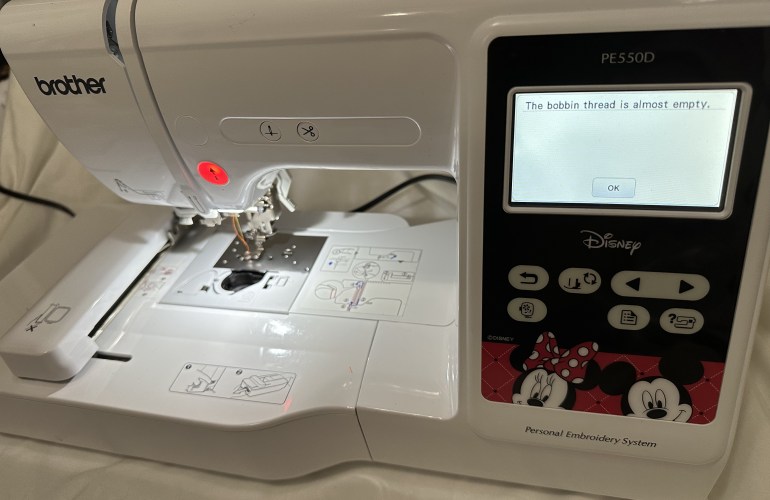
Since an embroidery machine uses hundreds to thousands of stitches per project it is only a matter of time before you experience the dreaded bobbin change alert mid-project. While this may seem like a headache, the machine makes it really easy to accomplish a seamless look even when this occurs. The machine will pause itself and alert the user that the bobbin thread is almost empty. At this point there are two options, to ignore or listen to the warning.
The first time my machine prompted me that the bobbin thread was almost empty I took off the hoop and saw that there was still a significant amount of bobbin left. A cautious person would simply change the bobbin but there is the ability to stall the machine by selecting okay on the prompt and pressing the green go button. After a few more stitches the alert will come back up. If you choose to play with the machine by pushing the bobbin further, it will learn to alert you when the bobbin is lower the next time. For this reason I recommend to always check the bobbin between alerts. Having only the top thread stitch out without any locking stitches on the bottom can cause the project to look sloppy.
If you do not heed the warning and the bobbin is completely diminished, simply pull out the unlocked upper stitches. Once the bobbin is replaced with a new one the machine will allow you to start where it left off or if you select the bottom right hand plus/minus icon it will allow you to go back one, ten or even a hundred stitches. My personal go to is to go back ten stitches to prevent any gaps or bald spots. This may seem like it would make the project look bulky but it really doesn’t since it is only ten stitches.

 MaddieAutumn